Kitten Keyboard Escape Stage Walkthrough
Keyboard layouts, pacing, and recovery after falls.
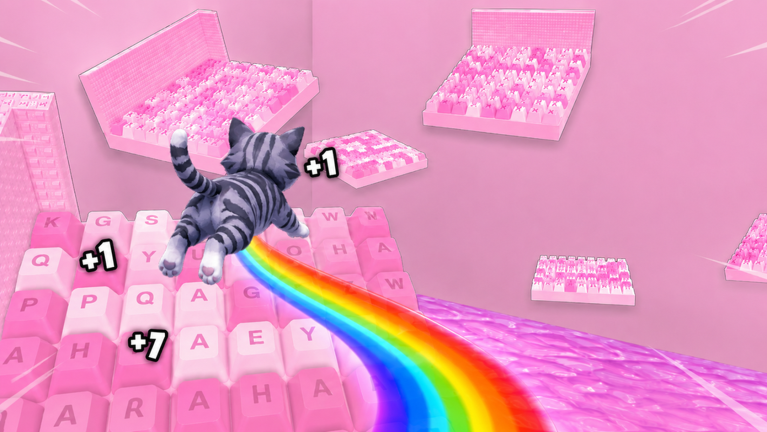
Keyboard stages in +1 Kitten Keyboard Escape blend incremental jump growth with obby precision. This walkthrough explains how worlds are structured, how to read keycap layouts before you jump, and how to recover when a fall sends your kitten backward. It complements Jump Power math with route habits that save more time than another shop purchase.
How keyboard worlds are built
Stages group into themed keyboard chains: letter clusters, wide spacebars, arrow-key zigzags, and candy-accented hazard keys. Difficulty rises through longer gaps, narrower landing surfaces, and sharper turn requirements—not through invisible walls or unrelated mini-games.
Progress is mostly linear within a world. Side paths are rare; when they appear, they usually reward currency rather than skipping mandatory jumps.
Before entering a new world
- Confirm jump upgrades from Upgrades Tier List match the world’s gap class.
- Redeem pending codes on Redeem Codes if currency is short.
- On mobile, apply Mobile Tips camera settings.
- During 3X weekends, set a segment goal on Session Planner instead of rushing entire worlds.
Early keyboard stages
Starter keys teach baseline timing. Platforms are wider and failures less punishing, but fall-backs still exist—use this zone to practice stopping momentum before edges.
Route habit: Walk to each key edge, pause one beat, then jump. Sprinting looks faster but increases overshoot on candy-colored caps that blend together.
Checkpoint mindset: Treat each cleared letter row as a mental save point. If you fall, repeat only back to the last row you fully controlled.
Mid keyboard stages
Mid worlds introduce diagonal jumps between offset keys and taller vertical stacks mimicking keyboard height. Jump power from stage clears should match these sections if you bought Early Game Build picks.
Camera habit: Rotate slightly before diagonals so both keys stay in view. Default camera behind the kitten hides narrow rear edges.
Co-op habit: In group races, call out when you attempt risky diagonals so friends do not bump you mid-air—see Racing Tips.
Late keyboard stages
Late layouts punish impatience. Gaps assume upgraded jump power and confident recovery after partial falls. Read Beat Hard Stages before brute forcing these chains.
Recovery habit: After a fall, replay the last three keys slowly. Anger-sprinting re-triggers the same mistake.
Economy habit: If a late segment repeats fails, farm an earlier world during Weekend Multiplier for one more jump upgrade instead of hour-long tilt.
Reading keycap visuals
Pastel keys look uniform. Focus on:
- Edge highlights showing cap thickness
- Shadow gaps between keys indicating true distance
- Accent colors marking hazard or moving keys when updates add motion
Official ASMR flips and candy vibes distract intentionally. Train your eyes on edges, not particles.
Segment strategy table
| Segment type | Risk | Tip |
|---|---|---|
| Flat letter row | Low | Practice stop-jump rhythm |
| Spacebar span | Medium | Verify jump tier before sprint |
| Arrow zigzag | High | Pre-rotate camera each key |
| Vertical stack | High | Buy jump upgrade if fails repeat |
| Narrow modifier keys | Very high | Learn in solo before co-op races |
Falls and send-backs
One wrong jump can send you back multiple stages. Send-back distance scales with section severity. There is no universal skip code—ignore chat spam promising otherwise.
When send-backs feel excessive, check whether you are under-leveled on Jump Power or attempting sections above Early Game Build recommendations.
Walkthrough versus scripts
Scripts advertising teleport skips break Roblox rules and often fail after patches—Script Safety. Legitimate walkthrough knowledge persists across updates even when specific key art changes.
Updating your mental map after patches
Developers tune stage spacing quietly. After Latest Update mentions obby changes, re-walk one earlier world to calibrate jump feel before pushing late areas.
Related pages
- Controls for input precision
- How to Play for loop context
- Progress Checklist to track cleared worlds
- Official Links for the live experience
Frequently Asked Questions
Quick answers about Kitten Keyboard Escape on Roblox.
Are keyboard stages the same every login?
Layouts persist as part of the experience design. Updates may tweak spacing; check Latest Update after patches.
Can friends skip stages for me in co-op?
Each player progresses individually. Friends can guide routes but cannot clear keys on your account.
What if I keep falling on one key?
Pause, lower camera speed, verify jump upgrades, and read Beat Hard Stages for advanced recovery tactics.