Kitten Keyboard Escape Getting Started Guide
Your first kitten jumps on the keyboard obby.
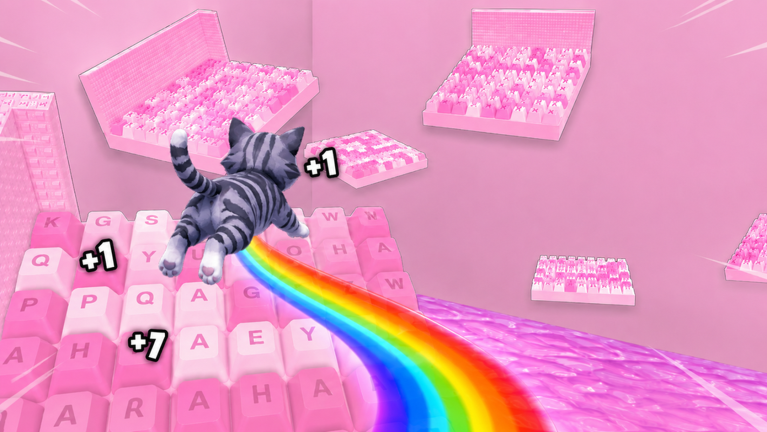
+1 Kitten Keyboard Escape drops you onto oversized keyboard keys as a small kitten whose jump power grows every time you progress. The candy-colored presentation, ASMR-style flips, and satisfying clears make the grind feel lighter than a traditional hardcore obby—but one wrong jump can still send you back several stages. This guide covers your first hour so you understand the loop before chasing multipliers, codes, or co-op races.
What kind of game this is
Kitten Obby Fan Club built a keyboard-themed incremental obby on Roblox. You move forward across keycap platforms, time jumps between narrow edges, and unlock stronger leaps as you clear chains. Progress is persistent within a session and across return visits, with shop upgrades accelerating jump growth.
You can play solo or race friends online. Both modes share the same stages; co-op just adds social pressure to keep moving. The experience is live on Roblox—not upcoming—with millions of visits and regular weekend events.
Launch checklist
Before jumping, complete these quick steps:
- Open the official place: +1 Kitten Keyboard Escape.
- Join the Kitten Obby Fan Club Roblox group and claim the free gift—steps on Group Rewards.
- Skim Controls if you are on mobile; PC players can skip for now.
- Bookmark Codes Hub for promo codes and weekend 3X timing.
These steps take minutes but prevent the classic new-player trap of grinding without free boosts.
First five minutes: movement and jumps
Spawn near the starter keyboard layout. Move with standard Roblox locomotion—WASD on PC, thumbstick on mobile. Jump with spacebar or the on-screen jump button.
Early jumps feel short. That is intentional. Each cleared segment increases your kitten’s power so later gaps become reachable without pixel-perfect sprint jumps. Do not fight the curve; clear what you can and let growth do the work.
Camera control matters on keycaps. Slightly angle the camera before diagonal jumps so you see both landing surfaces. Falling does not always mean instant failure, but many sections reset you backward when you miss—treat every gap seriously even when the vibe looks cozy.
Understanding stage progress
Stages chain as linear keyboard worlds with checkpoints implied by layout design rather than always visible flags. When you advance, you earn currency and jump increments. When you fall, you may repeat earlier keys.
There is no shame in repeating segments. Keyboard obbies teach muscle memory. Players who rush skip the subtle width differences between keys and lose more time to falls than they save by sprinting.
For a deeper route map after your first session, read Stage Walkthrough.
Currency and first purchases
Currency drops from clears and events. Spend first purchases using Early Game Build rather than random shop buttons. Jump-related upgrades usually outperform cosmetics for your first hour.
If a promo code is active, redeem it via Redeem Codes before shopping so boosted currency buys more upgrades.
Multipliers in plain language
Multipliers increase how fast rewards accumulate. Some are permanent unlocks; others appear during weekend 3X events covered on Weekend Multiplier. You do not need rebirth systems on day one—read Multipliers & Rebirth once jump power gains feel slow.
Playing with friends
Invite friends into the same Roblox server to race. You do not share one kitten avatar, but parallel progress turns stages into informal competitions. Wait for everyone to clear a tricky key section before sprinting ahead; griefing falls waste group time.
More etiquette lives on Racing Tips.
Session length advice
First sessions of twenty to forty minutes work well. Learn controls, claim gifts, buy one or two upgrades, and stop before frustration from fall-backs peaks. Use Session Planner once you schedule longer farms during 3X weekends.
What to read next
After this guide, follow this path:
- How to Play for the full loop
- Jump Power when upgrades appear in the shop
- Upgrades Tier List before major purchases
- Beat Hard Stages when difficulty spikes
Track milestones on Progress Checklist so returning after a day off feels structured instead of chaotic.
Unofficial wiki note
This fan wiki helps you learn faster but is not published by Kitten Obby Fan Club. Confirm major changes on Official Links and Latest Update.
Frequently Asked Questions
Quick answers about Kitten Keyboard Escape on Roblox.
Is +1 Kitten Keyboard Escape hard for beginners?
Early keyboard stages teach timing gently, but falls can send you back. Stick to short sessions and use free group gifts to grow jump power faster.
Should I play PC or mobile first?
Either works. PC offers precise jumps; mobile is fine after reading Mobile Tips. Pick the device you will stick with for upgrades.
What is the first thing to buy?
Follow Early Game Build for jump upgrades that unlock the next keyboard sections instead of cosmetics.