Kitten Keyboard Escape Controls Guide
Inputs that keep kitten jumps precise on every keycap.
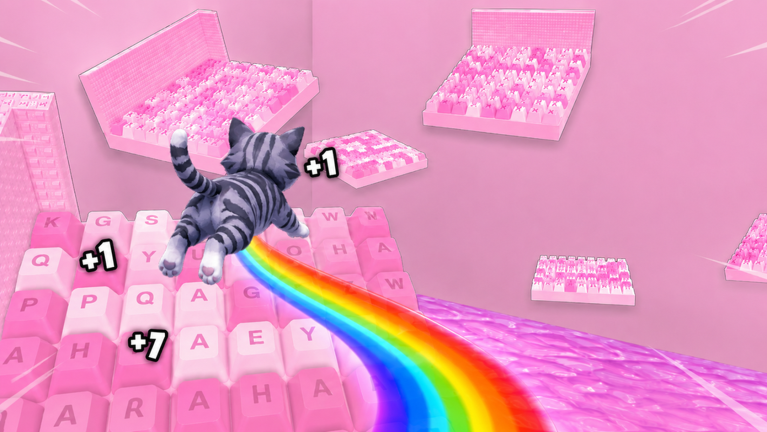
Precise controls separate clean keyboard clears from send-backs in +1 Kitten Keyboard Escape. The game uses standard Roblox movement on candy-themed keycap stages, but small settings differences on PC and mobile dramatically affect jump timing. This guide documents default inputs, recommended tweaks, and habits that pair with Stage Walkthrough routes.
PC controls (keyboard and mouse)
| Action | Default input |
|---|---|
| Move forward/back/strafe | W / S / A / D |
| Jump | Spacebar |
| Camera rotate | Hold right mouse button + move mouse |
| Zoom | Mouse wheel |
| Menu / Roblox overlay | Esc or Roblox top bar |
Roblox does not require remapping for basic play, but competitive obby players often:
- Lower mouse sensitivity for smoother cap edge aiming
- Use toggle sprint sparingly—many fails come from overshooting key edges
- Jump on release timing experiments only after standard press fails; muscle memory matters
Pair PC play with Jump Power upgrades before assuming a gap is impossible.
Mobile controls (touch)
| Action | Default input |
|---|---|
| Move | Virtual thumbstick (left) |
| Jump | Jump button (right) |
| Camera | Swipe on screen |
| Menu | Roblox mobile menu icons |
Mobile adds latency versus keyboard spacebar jumps. Read Mobile Tips for deeper tuning. Essentials here:
- Increase jump button size in Roblox settings if mis-taps cause falls
- Drag camera before diagonals; do not swipe mid-air unless necessary
- Reduce graphics if frame drops alter jump timing
Camera fundamentals for keyboard stages
Keyboard obbies hide landing depth behind pastel art. Always:
- Align facing the next key before moving
- Rotate slightly downward to see cap edges
- Stop movement before jumping unless a segment requires momentum
Hard sections in Beat Hard Stages assume camera discipline.
Jump timing habits
Stop-jump: Release movement keys, jump, then strafe mid-air only when routes require it.
Diagonal setup: Pre-turn 30–45 degrees so kitten velocity matches key offset.
Retry rule: Two fails → slow walk through prior key; three fails → check Upgrades Tier List.
Controls and co-op racing
When racing friends online, avoid standing on jump edges while others approach—collision physics cause falls. Racing Tips covers spacing.
Accessibility considerations
Roblox platform settings include reduced motion and UI scale options. Larger UI helps mobile jump accuracy. PC players with limited mobility may prefer shift-lock experiments; test in early worlds before hard stages.
Controls versus scripts
Auto-jump scripts and input macros violate Roblox rules and break unpredictably—Script Safety. Legitimate improvement comes from settings and practice, not injected tools.
First-time setup checklist
- Confirm device defaults in a safe early key row from Getting Started
- Tune camera sensitivity
- Claim Group Rewards before hard tuning sessions
- Log comfortable settings on Progress Checklist when switching devices
Related guides
- How to Play for session structure
- Mobile Tips for phone-specific depth
- Stage Walkthrough for route application
PC troubleshooting
| Symptom | Likely cause | Fix |
|---|---|---|
| Overshooting keys | Sprinting into edges | Walk-stop-jump rhythm |
| Missing diagonal | Camera too narrow | Pre-rotate before move |
| Inconsistent air control | Strafing during takeoff | Release WASD before space |
| Menu accidental opens | Mis-hit Esc | Clear keyboard overlays |
Mobile troubleshooting
| Symptom | Likely cause | Fix |
|---|---|---|
| Short jumps | Mis-taps / FPS dips | Enlarge jump button; lower graphics |
| Drift into void | Thumbstick residue | Recenter stick; clean screen |
| Blind landings | One-hand camera | Two-hand pause before diagonals |
Recording your settings
Write sensitivity, button size, and graphics level on Progress Checklist when you find a stable setup. Reapply after Roblox app updates reset client preferences.
Frequently Asked Questions
Quick answers about Kitten Keyboard Escape on Roblox.
Can I rebind jump on PC?
Roblox supports limited control customization through settings and third-party hardware maps, but spacebar is standard for obbies.
Why do mobile jumps feel shorter?
Touch timing and frame rate affect perception. Tune mobile settings and verify jump upgrades before blaming controls alone.
Does shift-lock help on keyboard keys?
Some players prefer shift-lock for straight-line jumps. Test in early stages; diagonals may still need free camera.