Kitten Keyboard Escape Guides & Walkthroughs
From your first kitten jump to clearing the hardest keyboard stages.
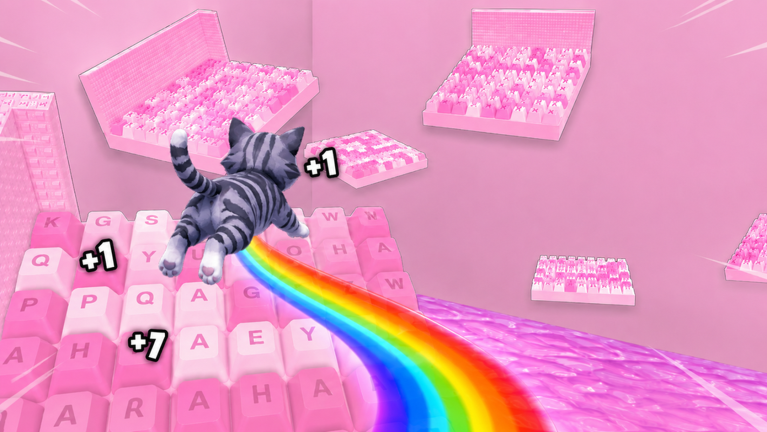
Welcome to the guides hub for +1 Kitten Keyboard Escape, the candy-colored keyboard obby where you play as a kitten, jump power grows with progress, and one mistimed leap can send you back several stages. Whether you joined to race friends online or to chase ASMR-style flips and satisfying clears, these guides explain the mechanics without spoiling the fun.
Start here if you are new
If you have never played a keyboard incremental obby, begin with Getting Started. It walks through your first ten minutes: movement, how jump strength scales, where multipliers appear, and why falling is part of the design rather than a punishment to rage-quit over.
From there, How to Play explains the full session loop—spawn, stage chain, currency, upgrades, and when to push forward versus farm jump power. Controls documents PC and mobile inputs so you are not guessing mid-jump.
Core mechanic guides
Jump power is the heart of Kitten Keyboard Escape. Read Jump Power for numbers-minded players who want to know when upgrades outpace raw stage clears. Multipliers & Rebirth covers permanent and temporary boost layers, including how weekend 3X events interact with your build.
For route knowledge, Stage Walkthrough breaks early and mid keyboard layouts into readable sections with checkpoint habits. When difficulty spikes, Beat Hard Stages focuses on patience, camera angles, and recovery after bad falls. When send-backs tilt you, open Fall Recovery before rage-quitting.
Specialty guides
- Vs Speed Keyboard Escape — stop mixing codes and Discord social flows from SecretVerse titles.
- ASMR Candy Vibes — audio, camera, and chill session settings that match Kitten Obby Fan Club’s candy loop.
- Fall Recovery — sixty-second reset loops after punishing falls.
PC navigation shows the first eight guide pages; use this hub (“View all”) for the full list.
Pair guides with other hubs
Guides explain how to play; other sections help you play smarter.
- Claim free rewards first via Codes Hub and Group Rewards.
- Spend currency wisely using Upgrades Tier List and Early Game Build.
- Plan co-op races with Racing Tips or mobile adjustments in Mobile Tips.
- Track milestones with Progress Checklist.
Guide reading order
There is no wrong order, but this path matches how most players improve:
- Getting Started
- Controls and How to Play
- Jump Power plus Multipliers & Rebirth
- Stage Walkthrough then Beat Hard Stages
- Fall Recovery once send-backs start stacking
- Vs Speed Keyboard Escape if search results send you to the wrong game
Revisit Jump Power after major updates listed on Latest Update. Keyboard obbies change stage pacing quietly; a guide that felt optional at launch may become essential after a balance pass.
About this wiki
This is an unofficial fan resource for Kitten Keyboard Escape on Roblox. Facts are checked against the live experience and developer-facing descriptions, but always confirm patch notes on the official game page linked from Official Links.
Quick picks by problem
| Stuck on… | Open this guide |
|---|---|
| First login confusion | Getting Started |
| Gaps feel too wide | Jump Power |
| Weekend boost timing | Multipliers & Rebirth |
| Repeated send-backs | Fall Recovery then Beat Hard Stages |
| Wrong codes / Discord social steps | Vs Speed Keyboard Escape |
| Loud or stressful sessions | ASMR Candy Vibes |
| Touch controls | Controls plus Mobile Tips |
| Title tags like [X2] | Event Banners |
Kitten Obby Fan Club designed progression around jump growth and fall penalties—these guides teach that loop without mixing facts from Speed Keyboard Escape clones.
Frequently Asked Questions
Quick answers about Kitten Keyboard Escape on Roblox.
Which guide should I read first?
Start with Getting Started, then Controls if you are on mobile. Jump Power and Multipliers become important once you finish the first keyboard worlds.
Do guides cover co-op racing?
Mechanic guides focus on solo progress. For racing friends online, pair Stage Walkthrough with Racing Tips on the Players hub.
Will guides mention codes and weekend bonuses?
Yes where relevant. Detailed reward steps live on the Codes hub, but guides link there so you know when boosts change your jump math.